Sanad is the AI assistant of Sanad Bait It works like a contracting consultant in your pocket: ask about the price of any item, upload your plan, a photo or a video of your space, and tell it exactly what you want priced. It answers at market prices for the Eastern Province and Madinah, prepares a detailed quote and books a free site visit when you are ready.
Everything Sanad can do for you
Finishing and renovation prices at three levels
📐Prices your plan: all of it, or only what you ask for
📷Understands photos and estimates measurements
🎬Understands what you say in a video
📄Detailed PDF quote, trade by trade
🧱Building material prices
📅Books your free site visit and takes your location
🟢Talk to our team on WhatsApp
🔎Tracks your request
🎙️Speak instead of typing, and listen to replies
🗣️Arabic, English and every dialect
🧠Remembers your project and guides you
📲Sanad app on your phone
💰 Finishing and renovation prices at three levels
Ask about any item, from painting, gypsum and porcelain to complete villa finishing, and Sanad gives you the economy, mid-range and luxury price with the materials of each level. Our current prices are for the Eastern Province and Madinah and follow the market rates customers there know.
How to use it:- Write the item and the area, e.g. "paint 120 m² apartment".
- Mention your city so it uses the right market.
- Ask it to compare levels, or materials only / labour only.
📐 Prices your plan: all of it, or only what you ask for
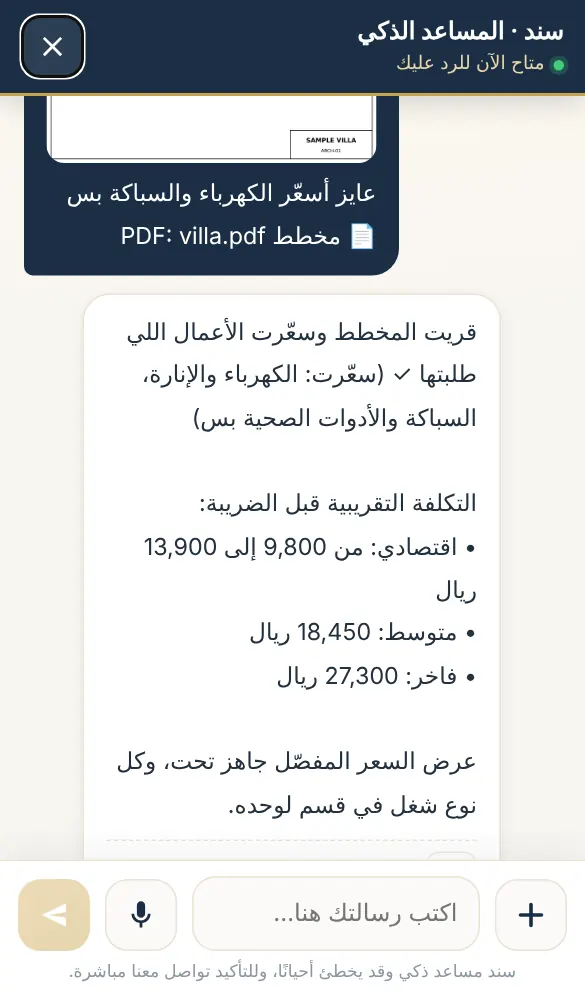
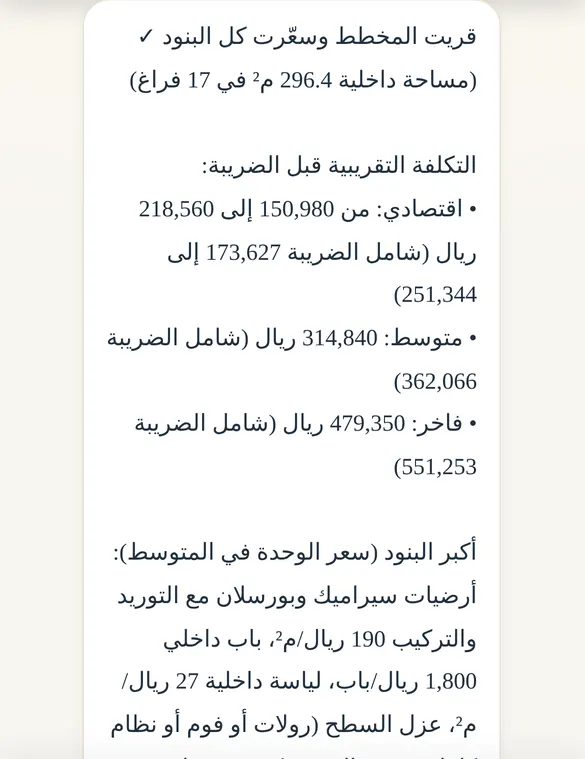
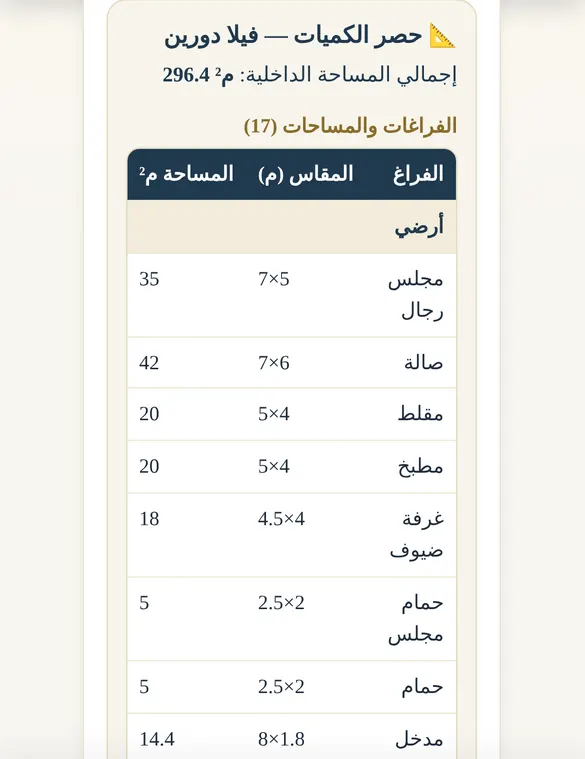
Upload the plan as a PDF or photos. Write what you want priced: "everything" for a full quantity take-off of every trade, or specific trades like "electrical and plumbing only". It reads the drawings, counts points and quantities, and prices only what you asked for, then notes any issues it found in the plan.
How to use it:- Tap + then "Plan / file" and choose the PDF (up to 24 pages).
- Before sending, choose "Price everything" or "Something specific" and write it.
- Correct any dimension it misread, and it recalculates immediately.
In depth: how it calculates construction cost from plans, with a full villa example
📷 Understands photos and estimates measurements
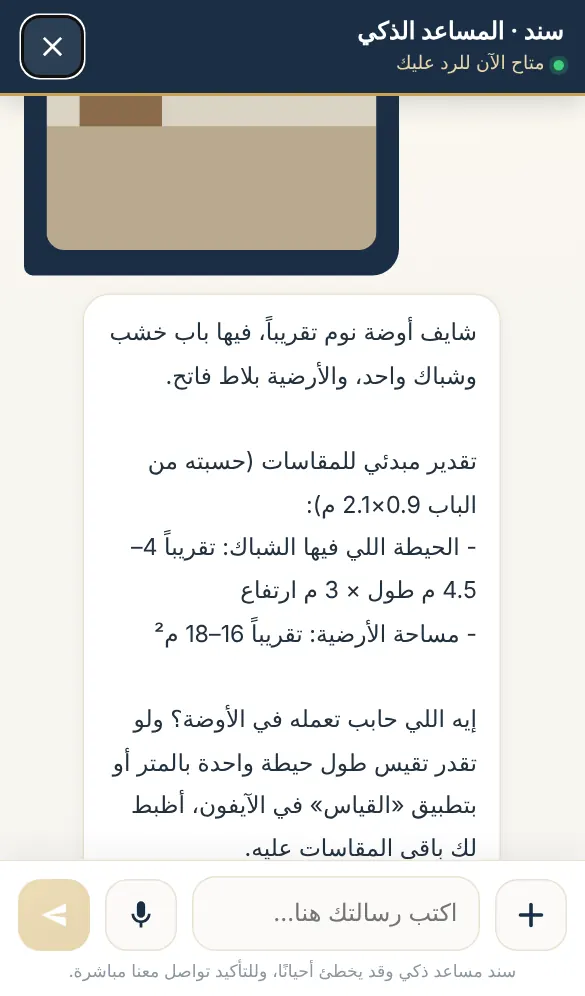
Send a photo of a room, a crack, damp or an old bathroom. Sanad describes what it sees, estimates the dimensions from known references (door, tiles, ceiling height) and says how it calculated them, then asks what you want done. It prices only what you ask for.
How to use it:- Tap + then "Camera" or "Photos".
- Write what you want, e.g. "paint this wall only", or let it ask you.
- Give one real measurement (tape or the iPhone Measure app) for more accuracy.
🎬 Understands what you say in a video
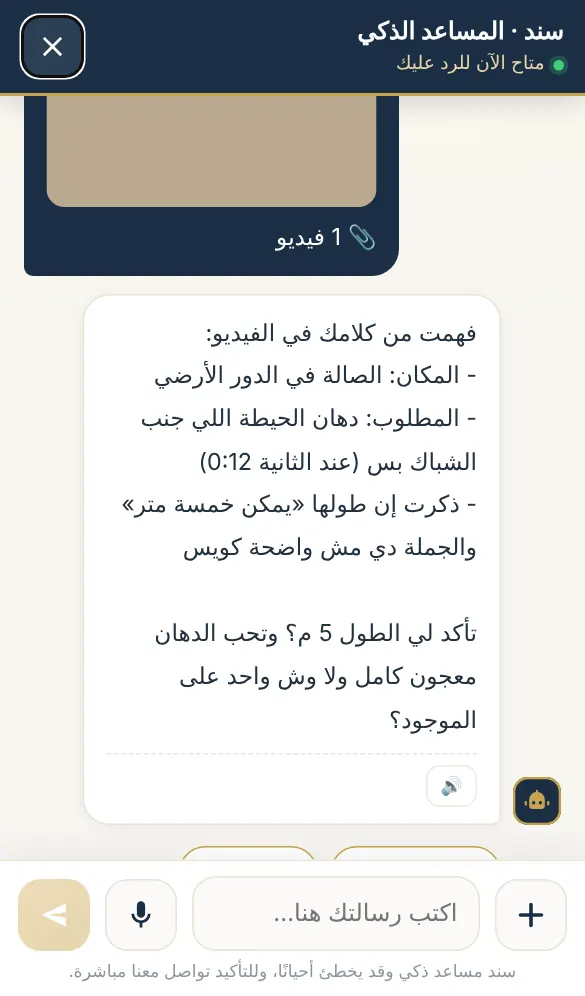
Film your place and explain while you walk. Sanad watches frames from the video and, when video speech is enabled, reads what you said with its timing, so "this wall" at second 12 means the wall shown at second 12. It understands Saudi, Gulf, Egyptian and other dialects, English and mixed speech, sums up what it understood, and asks about anything unclear.
How to use it:- Tap + then "Camera" and record, or choose a video from "Photos".
- Say what you need in the video, or write it under the video.
- Confirm its summary before it prices.
📄 Detailed PDF quote, trade by trade
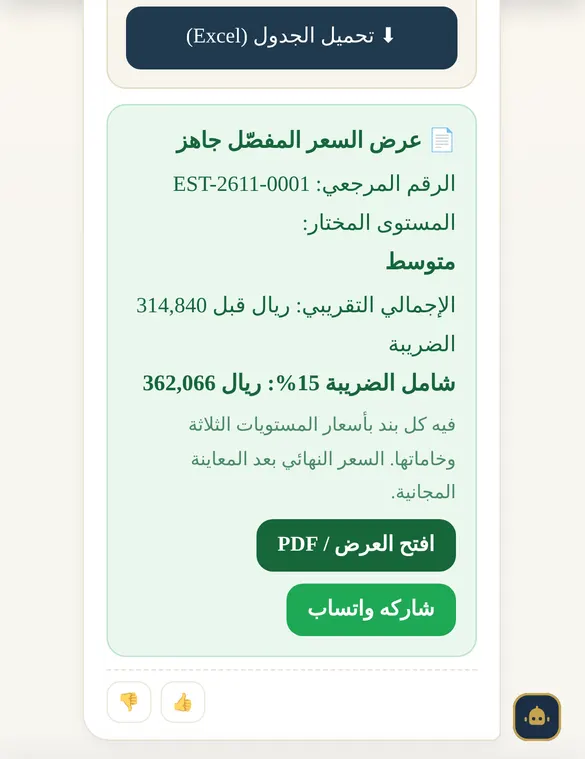
Get a quote with a reference number: each trade in its own section with its total (plastering, waterproofing, painting, gypsum, electrical, plumbing…), every item with quantity, unit price and specs for each level, the payment plan, and the establishment name if you want the quote addressed to it. Open it, download it as PDF or Excel, or share it on WhatsApp.
How to use it:- Ask for a detailed quote after the estimate.
- Tell it the organisation name and number of payments if you need them.
- Find it later in "My requests" in the app.
🧱 Building material prices
Ask about cement, rebar, blocks, Jotun or Al Jazeera paint and more, and get the market price with its source and date.
How to use it:- Write the material and the quantity.
- Ask it to compare brands or sizes.
📅 Books your free site visit and takes your location
Choose the day and time that suit you, and send your location with one tap: your current location, or a point you pick on the map with the address written. Our team visits to measure and confirm the price.
How to use it:- Write "book a free visit" or use the button.
- Tap + then "My location": current location or pick on the map.
- Keep your reference number to track the visit.
🟢 Talk to our team on WhatsApp
Whenever you prefer a person, tap "WhatsApp us" from the + menu and the message is ready. Sanad can also register your request so our team calls you.
How to use it:- Tap + then "WhatsApp us".
- Or ask it to register your request with your phone number.
🔎 Tracks your request
Know the status of your booking or quote request with its reference number and your phone number, from the tracking page or from "My requests" in the app.
How to use it:- Keep the reference number you receive.
- Open "My requests" and tap "Check status".
🎙️ Speak instead of typing, and listen to replies
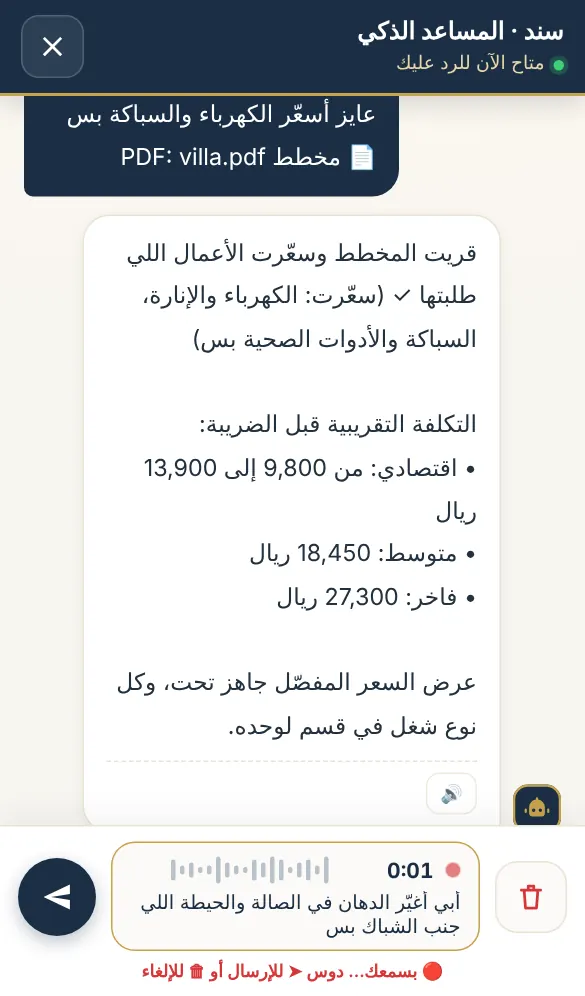
Tap the microphone: a recording bar appears with a timer and your words written as you speak, then send with one tap or delete. Tap 🔊 under any reply to hear it.
How to use it:- Tap 🎤 and speak naturally.
- Tap ➤ to send or 🗑 to cancel.
- Tap 🔊 under a reply to listen.
🗣️ Arabic, English and every dialect
Write in Arabic or English, formal or in your dialect; Sanad replies in your language.
How to use it:- Write the way you speak.
- Switch language any time.
🧠 Remembers your project and guides you
It keeps what you tell it during the conversation (size, budget, taste, location) and does not ask again, and it points you to the right page among our services when it helps.
How to use it:- Come back from the same phone to continue.
- Ask it about any of our services.
📲 Sanad app on your phone
Install Sanad on your home screen like an app, with shortcuts to estimate costs, upload a plan or photos, book a visit and "My requests" with every quote and booking you made.
How to use it:- Open the app link on your phone.
- iPhone: Share then "Add to Home Screen". Android: "Install".
How to work with Sanad, step by step
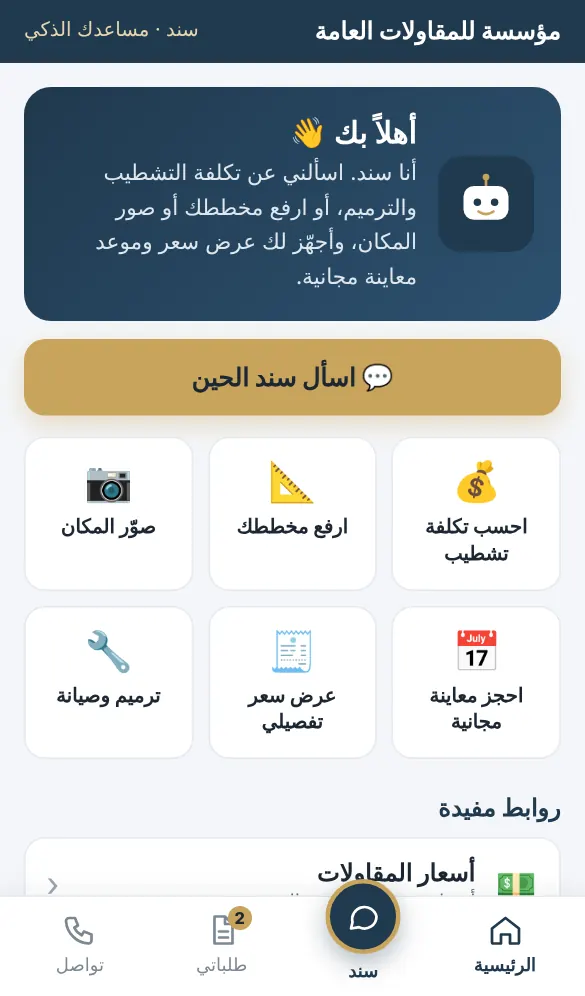
- Tap the chat button on any page, or open the Sanad app.
- Write your question, or tap + to attach a plan, photo or video.
- Before sending a file, say what you want: "Price everything", "Something specific", or "Just your opinion". If you write nothing, Sanad asks you first.
- Get the estimate at three levels and choose what fits you; Sanad prepares a detailed PDF quote.
- Book a free site visit; our team confirms the final price in a formal contract.
Chat tools
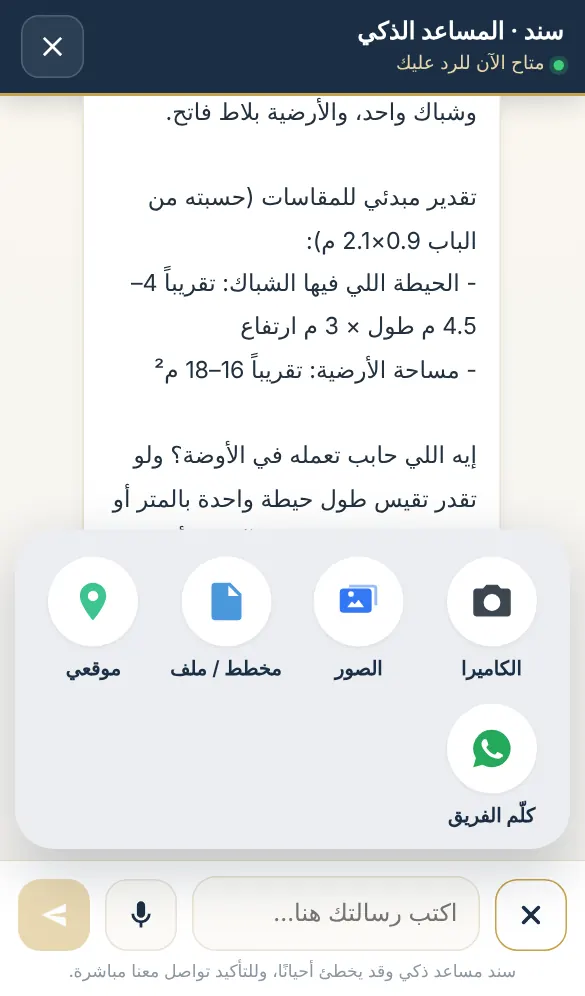
- ➕The + menu
Camera (photo or video), Photos (from your gallery), Plan / file (PDF only), My location (current or from the map), and WhatsApp us.
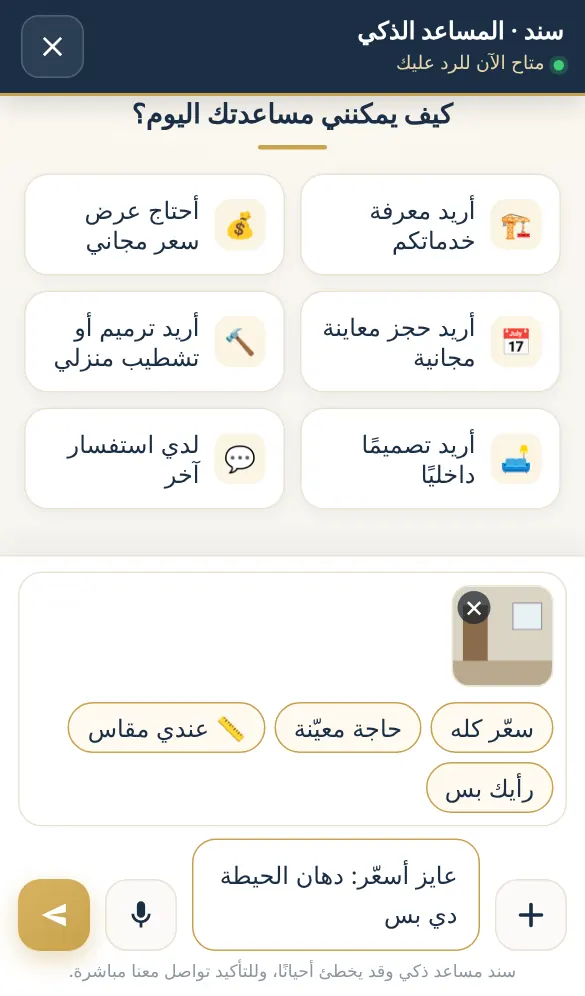
- 📎Files wait for your words
Attached files appear above the message box, with quick choices: Price everything, Something specific, I have a measurement, and Just your opinion.
- 🎤Microphone
Speak and see your words written live, then send or cancel.
- 🔊Listen
Tap under any reply to hear it read aloud.
- ⚡Quick replies
Buttons under some replies so you can answer with one tap.
Tips for the most accurate answer
- Say exactly what you want priced: the whole file, or specific trades or rooms.
- Mention the city and neighbourhood, the property type and the level you lean to.
- For photos, include a door or a full wall in the frame, and give one real measurement if you can.
- For videos, film slowly in good light and say what you need as you point at it.
- For plans, upload floor plans with dimensions; 3D views do not help the take-off.
- Correct anything it got wrong; it recalculates right away.
Sanad on your phone as an app
- Open the app link on your phone.
- iPhone: tap Share, then "Add to Home Screen".
- Android: tap "Install" when it appears.
- In "My requests" you find every quote and booking you made, with a "Check status" button.
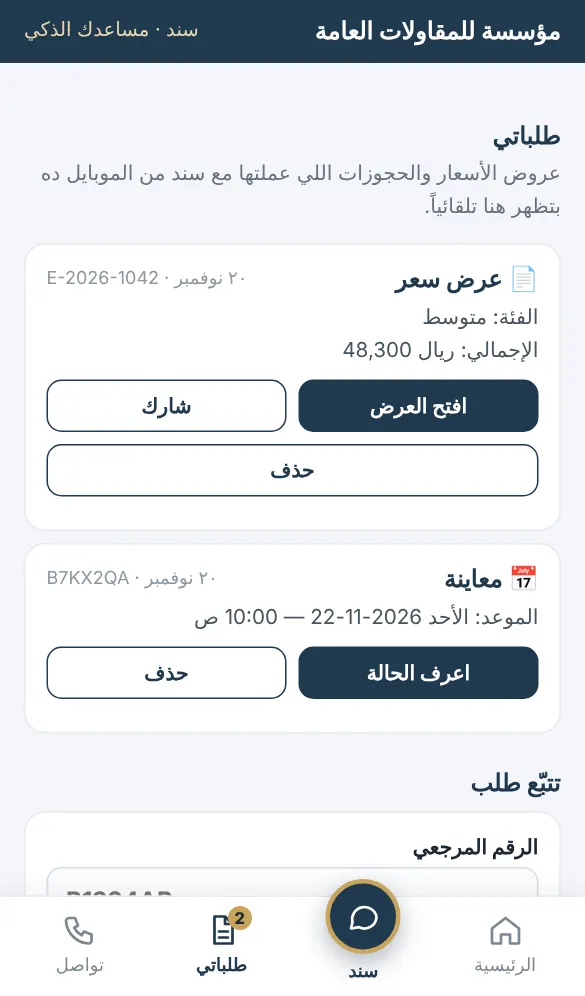
From a real conversation
Try asking now
Plainly: what Sanad is not
- Sanad is an AI assistant, not a human employee; our team follows up on your request.
- Its prices and quantities are preliminary estimates; the final price comes after the site visit and a contract.
- Measurements from photos and videos are approximate; it says how it estimated them so you can correct them.
- It may misread an unclear plan or sentence; it states its assumptions and asks instead of guessing.
Useful pages
- Construction & finishing price guide
- Building material prices
- Construction cost from plans with AI
- Renovation & finishing in the Eastern Province
- Sanad app
- Track your request
- Instant quote form
- Privacy Policy
FAQ about Sanad
Is Sanad a real person?
No. Sanad is an AI assistant built for Sanad Bait Our team follows up on every request and contacts you after you register it.
Which areas do Sanad's prices cover?
Our current prices are for the Eastern Province and Madinah. They follow the market rates customers there are used to, at three levels (economy, mid-range and luxury), and Sanad helps you pick the level that fits your budget.
How accurate are Sanad's prices?
They come from our price guide and are preliminary estimates. The final price is set after a free site visit and confirmed in a formal contract.
Can I price only part of my plan, like electrical and plumbing?
Yes. Upload the plan and write what you want, for example "electrical and plumbing only". Sanad reads the plan to count the points and quantities, then prices only those trades. Write "price everything" when you want a full take-off.
What if I send a file without writing anything?
Sanad will not price anything on its own. It tells you briefly what it sees and asks what you need: the whole file, specific items, a quantity take-off, or just its opinion.
Can Sanad measure a room from a photo?
It gives an approximate estimate using known references such as the door, tiles and ceiling height, and says how it calculated it. For exact figures, give it one real measurement (with a tape or the iPhone Measure app) and it adjusts the rest.
Does Sanad understand what I say in a video?
Yes, when video speech is enabled. It understands Saudi, Gulf, Egyptian and other dialects, English and mixed speech, links what you say to the moment in the video, and asks about any unclear sentence instead of guessing.
Does it work in English and by voice?
Yes. Write in Arabic or English, or tap the microphone and speak. You can also tap 🔊 under any reply to hear it.
Is there a Sanad app?
Yes. Open the app link on your phone and choose "Add to Home Screen" (iPhone) or "Install" (Android). It keeps your quotes and bookings in "My requests".
Is it free?
Yes. Asking Sanad, the estimate, the PDF quote and the site visit are all free.
What happens to my data?
Your conversation and files are used only to serve your request. Do not send ID numbers or bank details in the chat. See the privacy policy for details.